Tuesday, August 9, 2011

WebCenter Custom Portal App - What happened to my changes? MDS runtime vs designtime (JDeveloper)

Have you ever been in a situation where you had created a new resource, such as a WebCenter Navigation, at runtime (RT) - through the WebCenter Portal Administration client - only to have the new resource disappear (from within the Admin client) upon a redeployment of the portal application?  If so, don’t be alarmed the new resource hasn’t been lost, only the “list” of resources that the Admin client uses to display the resources, has been updated (over written) from re-deployment.  Probably you are wondering why this is so?  In this blog I will attempt to make this clearer on how this (and a few other) scenarios are handled in MDS.

First of all, a brief background on MDS (Meta-Data-Services) and its role with WebCenter.  The MDS framework allows you to create customizable applications.  A customized application, specifically in this case a WebCenter Portal application, contains a base application (the base documents) and one or more layers containing customizations.  MDS stores the customizations in a metadata repository (usually file based for development, and database for staging environments) and retrieves them at run time to merge the customizations with the base metadata to reveal the customized application.  The Oracle documentation mentions that since the customizations are saved separately from the base, the customizations are upgrade safe; a new patch to base can be applied without breaking customizations. When a customized application is launched, the customization content is applied over the base application.

Indeed as the documentation states, the new customization (which in my example was a new Navigation), is safe, since it is still stored in the MDS repository.  However, what was not saved (upon a redeploy) is the resource list, which is stored in the generic-site-resources.xml file.  This file gets created automatically in JDeveloper whenever you create a WebCenter Portal application.  This following image shows where the generic-site-resources.xml file is located in the source path:


Notice that the generic-site-resources.xml file is located in the “file-based” MDS repository, and is “scoped” by an auto generated unique identifier (GUID).  The following is a code snippet that was taken from the generic-site-resources.xml from my example project.  Notice that it currently contains only one Navigation (Default Navigation) resource.  This Navigation resource is created OOTB for every Portal application.
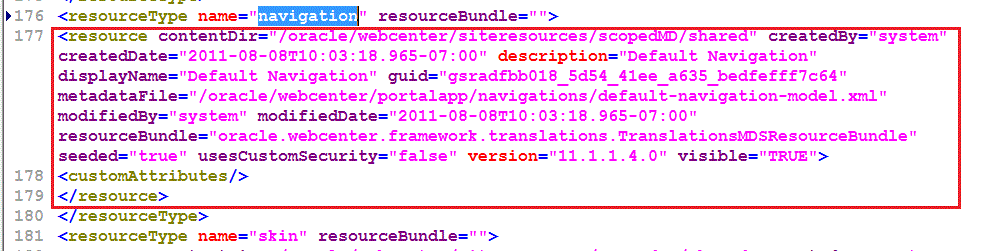

Since I am going to create a new Navigation at run time (RT), I will leave this file as is, and just deploy the Portal application to demonstrate the “lost” portal resource use case scenario.  Before I do, I want to first explain a little bit about this (and the other possible) scenarios. 

The following is a matrix of 3 of the most probable use cases (Scenarios).  The most typical use case is Scenario 1, where the portal resources have been created in development via JDeveloper, then deployed, portal resource(s) updated/added at RT, then the portal application redeployed (where redeployment could be for any reason, such as a class update, .etc, not necessarily the “same” resource update).  I will talk more about Scenario 2 later, but from the matrix you can notice the subtle differences. 

Use cases
Resource Create Location
(RT) Update
Export (RT) then Import (DT
Re-Deployment of application
Scenario 1
DT
X

X
Scenario 2
RT
X
X
X
Scenario 3
RT
X

X


Scenario 3 is the focus for this example, since once the Portal application has been deployed; there will most likely be many RT updates/additions before any redeployment occurs. 

Now back to the example.  During the deployment phase for a typical Portal application, you must ensure that you pick a target MDS repository.  The WebCenter Admin guide outlines the possible use case scenarios, such as using ANT, WLST, and the Enterprise Manager console.  However, for this example, I am just going to deploy straight from JDeveloper.  From JDeveloper, after the initial packaging, the prompt for the target MDS appears:


For my example, I will choose the default settings.  However, it is important to note the name of the partition, since this name will be used later in my steps to retrieve the “lost” portal resource.  Note:  The auto generated partition name comes from the Portal application’s web deployment profile name.  For example, the partition name here is MDS_Prop_Test_Scenario3_webapp1_V2.0.  You can also choose to supply the name of the partition, instead of accepting the default one.  This name (in JDeveloper), will appear in the drop-down list for subsequent redeployments.

Once the Portal application has been successfully deployed, I can use Enterprise Manager to view the new partition in the MDS repository.  NOTE: you can also use WLST to perform this action:


Now that all the required pieces have been set, it is time to go the application and create a new Navigation resource.  However, before I do, I want to create a Metadata “label” to the new partition first.  To do this I will use one of the custom Metadata Services WLST commands.  For more information on these commands see the Oracle® Fusion Middleware WebLogic Scripting Tool Command Reference 11g Release documentation.  You can think of the Metadata label as a save point in the repository, which will be an invaluable tool for tracking down MDS related issues.  For my example, once I have connected (via WLST) to WebLogic, I will then execute the following command to create my desire label:

createMetadataLabel('MDS_Prop_Test_Scenario3_webapp1','WC_Spaces','label_1')

Now that the label has been successfully created, I can then proceed to perform a runtime update to the application.  Once the application has loaded in the browser, you must log in to enable the Administration link to appear.  Clicking on the link reveals the Admin console.  For my example, I will create a new Navigation, and then add (this step is optional and is not required to produce the issue) a new Link:


Now that the new Navigation has been added to the MDS repository, it is time to redeploy the application.  First close the browser, so that there is not any open session (this step is not mandatory, but a good practice).  However, before I perform the redeployment, I want to again create another Metadata label save point.  This will enable me to capture the new changes (Navigation) in the MDS between a set of (label) save points.  Again from WSLT, I execute the following command:

createMetadataLabel('MDS_Prop_Test_Scenario3_webapp1','WC_Spaces','label_2')

Once the second label has been created, I can then perform an export, which will then enable me to see the files that have been altered and/or added.  The following is the WLST command to perform the export:

exportMetadata('MDS_Prop_Test_Scenario3_webapp1','WC_Spaces','/home/oracle/mds_export','/**','%','',false,false,false,false,'label_1','label_2')

Notice that the export will produce the results in the mds_export directory (the third parameter in the export command), and that the search is retrieving all the files: (i.e. /**)
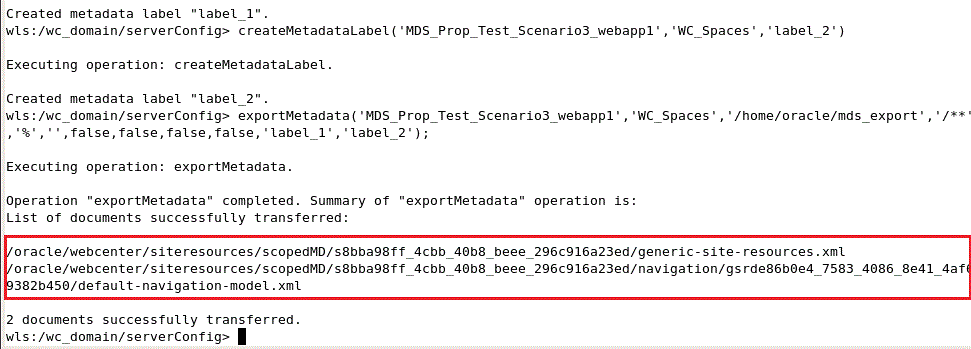

Notice that the file results contain an updated version of the generic-site-resources.xml.  Reviewing this file displays that the new Navigation entry to the navigation resource section:
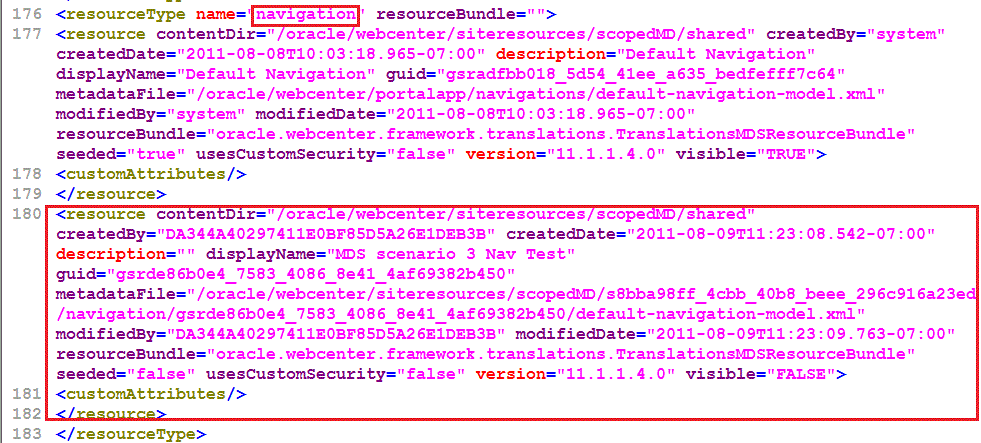

This addition is good since I now know that my changes have been saved into MDS.  Next, I can perform the redeployment test.

Following the steps for deployment before, while ensuring that I choose the same partition, I then reload the application in the browser.  Once again I log into the app, I then proceed to click on the Administration link to get to the console.  Now when I select the Navigations link (from the Structure left pane), I can see that the new Navigation that I create a minute ago is no longer displayed:


What happened?  Are all of my changes gone?  This could be trouble if there were many updates since the last deployment.  Let’s check the current source of truth the MDS repository.  Since there have been no run time updates, I will not be able to capture the changes using MDS labels.  This is actually good, since my changes should still be in the repository.  However, I can still use the export command to retrieve the generic-site-resources.xml file.  To perform the export, I use the generic form of the export command:

exportMetadata('MDS_Prop_Test_Scenario3_webapp1','WC_Spaces','/home/oracle/mds_export','/**');

From the result set of files I can see a version of the generic-site-resources.xml.  Upon reviewing this file, I can see that the entry for the new Navigation in the navigation resource section is no longer present.  So what happened?  Basically, the generic-site-resources.xml, which is present in the JDeveloper project source, gets included in the MAR archive.  Then during the redeployment, this version of the generic-site-resources.xml file then OVER WRITES the version of the same file that was stored in the repository.  You can think of this as "last edit wins".  This process is also different than "seeded" customizations, such as composer based page edits, or page creations.

So how can I get my Navigation portal resource back into the runtime?  Currently, the only way is to add the portal resource reference into the generic-site-resources.xml, which is stored in the JDeveloper file based MDS.  This way during redeployment the changes from the run time are not lost.  One way to provide some sort of a procedure of ensuring these runtime changes are added back in is to enable the source code system (i.e. SVN, .etc) to DIFF the changes.  This would mean that the exported generic-site-resources.xml would basically be copied to and then replace the current version of source that JDeveloper is targeting.


 Then you can then merge the updates through a DIFF tool, such as WinMerge:


Of course all of this would not be necessary IF you would first EXPORT the new portal resource from runtime, then IMPORT the portal resource into JDeveloper, BEFORE you redeploy.  This Scenario is basically Scenario 2, which I mentioned previous before.  With Scenario 2 (and Scenario 1 to some extent), you are now dealing with all of the other files (under the siteresources/scopedMD/{GUID} directory) that get stored in the MDS repository.  This basically means that these files will also need to be added to the JDeveloper project (source-controlled) file system.  Currently, getting these files into JDeveloper (if the files did not originally start there), is either a manual (export/import) process or through some custom script based process.  Either way the files will need to stay in sync, otherwise there is a chance of lost changes upon redeployment.

In conclusion, the “lost” portal resource behavior (Scenario 3) affects all portal resources that can perform an export from the runtime (the only portal resource that is not affected is Pages).  Using the above mentioned strategy, you can use a combination of source code control and MDS to help minimize runtime changes during redeployment of a WebCenter Portal application.

Wednesday, August 3, 2011

Follow up on Virtualbox....

Forgot the maybe most important piece of information:-)

Download VirtualBox here: virtualbox.org

Don't forget to download and install the Extension Pack from the same page. Latest version is 4.1 and it seems stable to me. Been using it since day one (and the beta before that). Not seen any issues.

Download pre-configured Oracle Virtual Machines from here: http://www.oracle.com/technetwork/community/developer-vm/index.html

Oracle's Virtualization page on OTN: http://www.oracle.com/us/technologies/virtualization/index.html

Generic Virtual Machines can be found here: virtualboxes.org

/Mikael

Using VirtualBox as Development Platform

This is a generic post regarding the usage of Virtual Machines and I will bring up topics that I frequently get asked about. There are several reasons why a Virtual Machine is a good choice for a development platform. A couple of reasons might be:

- The env. is contained as a whole and separate from whatever is happening on your host (host here equals the physical machine and guest will refer to the vm). This means that if you need to change host or upgrade OS isn't a big deal. Just have a backup of the VM's.

- You can share your whole dev. env. by simply let someone get a copy of the VM. This is how we share our demo env. internally from Development to the Field organizations.

Performance is rarely an issue anymore since most people should have access to a laptop/pc with at least 8GB RAM and the host OS should be 64 Bit. Some people even have access to SSD drives which removes the last bottleneck, Disk IO.

Moving from VMware to VBox

Inside Oracle most every product team these days share their new releases or early betas using pre-configured VM's and we see them in basically two formats, VirtualBox exports (sometimes just the VDI file) and VMware VM's. VirtualBox will handle both formats with ease. Most everything is now done on linux at Oracle so we see very few VM's with other OS's. Sharing the VM is the same but with Linux there are now license issues.

Some of the product demo VM's are now also available on OTN, http://www.oracle.com/technetwork/community/developer-vm/index.html

Unless the VM is shared in a VBox export format (which is of course is imported via File - Import Appliance) you can create a new empty VM but skip the disk creation step.

Create New Virtual Machine2

Screen shot above showing the step in the Create New Virtual Machine Wizard where the Disk file will be created. Un-check the checkbox and click Continue.

OEL64bit XE11g  Storage1

Later in VBox you can just add the disk file (the VDI or VMDK file). Screen shot above shows where to add the disk file in the Storage section in the Settings for the VM. Only thing you need to know is what type of controller that was used in the original VM, IDE, SATA or SCSI. If you have a VMware VM you can just open the .vmx file with any text editor and you can find this info in there.

When you have the VM running in VBox you will have to install the Guest Addtions (and if this was a VMware VM you need to remove VMware Guest Tools).

The Guest Addistions install will compile some kernel extensions and the Guest (the Virtual Machine) needs to be setup so that it can do just that, compile and build kernel extension. I will cover this in more detail later as it's rarely an issue. It can be an issue if you build a Guest from scratch and forgets to add these components (some kernel packages, the gcc compiler etc.).

Networking

Most questions I get relates to network issues and I think by now I have convinced most people to do what I do almost 100% of the time, run the guest with NAT networking. It will basically always just work. Regardles if your host is connected to a network or not. It also allows you to do everything you would expect from within the VM in terms of inbound and outbound traffic. Some tidbits of info:

  • Each NAT guests on a host will have it's own subnet and they will all have the IP 10.0.2.15.

  • A NAT guest will piggyback on the hosts's external IP and will have the same reach as the host. This also applies to VPN connections which means that if the host is on a VPN connection all NAT'd VM's will also be "on VPN". More interesting is perhaps that all these VM's can be reached from the VPN network using the Host's VPN IP. More on this under Port Forwarding below.

  • You can create 4 Network interfaces using the VBox GUI (you can create another 4 using the command line interface). Other than NAT you can have Bridged, Host-only, Internal and a Generic mode. More on these modes here: http://www.virtualbox.org/manual/ch06.html#networkingmodes

Port Forwarding

This is one of the differentiating factors between VMware Player (Linux/Windows), VMware Fusion (Mac) and VirtualBox. VMware Workstation (Windows/Linux) has this feature but comes with a price tag of $189 currently. Oracle stopped licensing VMware Workstation around version 5.5 (current is 7.1) so my experience is a bit outdated but in 5.5 Port Forwarding was a bit complicated to setup. Not exactly intuitive, not the first time anyway.

OEL64bit XE11g  Network1

The Port Forwarding button opens the dialog below and I would say that this is pretty intuitive, correct?

VirtualBox

The name column is just for information purposes, you can write whatever you want or leave the default value which is Rule1, Rule2 etc. Protocol is a dropdown and it's either TCP or UDP. Host and Guest IP can be left blank (VBox knows both already). Left to configure is what port in the guest that should be exposed on the host.

With port forwarding configured any service running in the guest can be reached via the host's IP and Port. As an example using the ports above you can connect with ftp from the host to the ftp server inside the guest with ftp://localhost:8021/. If someone on the same network wants to access the ftp server in the guest on your host they would simple replace localhost with the actual IP of your host. They don't need any info about the guest IP. They don't even need to know that this is a VM running on your laptop/desktop.

All the details here: http://www.virtualbox.org/manual/ch06.html#natforward

This is totally transparent to the host and the guest in most cases. One case where you need to do a little bit of configuration inside the guest is if you run a WLS instance and want to deploy to it from a JDev (or any other tool) running on the host or remote. The WLS instance inside the guest needs to know the real IP of the host for this to work. There is a such a setting in the Advanced Section on the WLS Server Console, External Listen Address. Map this to the real IP of host and everything should work just fine.

M1

Navigate to the WLS Console for the AdminServer and click on the Advanced link and the settings shown above will appear.

Remote Access

There are several ways to access a guest both when you're local on the host or if you want to access your guest remotely or give someone else remote access to a guest that runs on your laptop/desktop. You can configure VNC inside the guest or enable Remote Desktop if it's Windows. You can install tools like NX from nomachine.com or Teamviewer from teamviewer.com inside the guest. Assuming we still run NAT you will need to configure Port Forwarding for any solution that runs as a process inside the guest, even pure command line tools like telnet and ssh. But there is a better alternative. Install nothing! Take a look at the dialog below. It shows the Display Settings for one of my guest. VirtualBox has a built-in Remote Display feature and it's better than anything VMware or Parallels have if you ask me.

OEL64bit XE11g  Display

Remote Display exposes the Console output of the guest using RDP. This means that you can access your linux guest VM's desktop remotely (or locally from the host) using Windows Remote Desktop (or any RDP client on Mac or Linux) and dynamically resize the remote window. you can also copy and paste text (this might behave a little different depending on the guest OS). Since it's the Console you have access to and the Remote Display Server is hosted by VBox and not the guest OS it will also stay connected during a reboot so you can see the usual Console output as if you had local access. As you can see from the dialog you can also share this Remote Display with multiple users. This Remote Display access has no connection to what type of Network your guest is using, NAT, Bridged, Host-only or even no networking. You can always enable the Remote Display.

I'll stop here for now but I will return with more on Virtualization. Both regarding VirtualBox and OVM.

/Mikael


Monday, August 1, 2011

Will They Come If You Build It?


While we all anxiously await the next major release of Oracle WebCenter, it may be a good time to take a step back and discuss some non-technical issues around deployment in the enterprise that will become more and more important as WebCenter builds on feature sets that are designed to support social collaboration.

For those who haven’t heard, there are big changes in the works for WebCenter.   The product suite is being restructured around a four-pillar model:  WebCenter Sites, WebCenter Portal, WebCenter Connect, and Webcenter Content.  The promise is that WebCenter is and will increasingly become “the user engagement platform for social business—connecting people and information.”  Stay on top of all new developments by checking out the WebCenter product management site here:   http://www.oracle.com/us/products/middleware/webcenter/index.html.

The increased emphasis on connecting people and information will shape all four of these WebCenter pillars, but arguably none will be affected more than WebCenter Connect.  The product is focused on “purposeful collaboration” which “provides the social enterprise building blocks for end users to build effective and collaborative communities.”  Check out the product brief for WebCenter Connect here:  http://www.oracle.com/technetwork/middleware/ontrack/overview/owc-connect-brief-427791.pdf?ssSourceSiteId=ocomen.

We are all excited about these new developments.  It has been apparent for some time that successful deployment of collaboration tools like WebCenter Connect will be something that gives global businesses a major competitive advantage over organizations that opt not to work on improving their collaboration processes.  Having a product like Connect in the social collaboration toolkit will go a long way towards helping organizations create or re-engineer collaboration, but it isn’t, nor can it be, an all-inclusive answer.  Connecting people, content, and process is much easier said than done, however.  There are several key issues around how people behave and how they are motivated that need attention if deployment of new social collaboration tools in any enterprise is going to be successful.

While people are social creatures, even in the work environment, there are a number of factors that will block uptake of a new product that IT rolls out with the ostensible purpose of “making the organization operate better” and “helping you work more efficiently”.  The most significant blocking factor is behavioral inertia:  people will operate today and tomorrow much like they’ve behaved yesterday unless they are motivated to chart a new course.  Behavioral inertia manifests itself in several ways:

·         Most members of an organization already have well-established people networks that they think are good enough to meet their collaboration needs.
·         Ironically, many people will claim that they do not have the free bandwidth necessary to learn a new set of tools that are being brought in to help them work more efficiently and productively.
·         The chicken/egg syndrome applies to social collaboration solutions:  until a deployment picks up the critical mass necessary for it to attract users, it will only be a partial success at best or, in the worst case, it may fail.

So, other than addressing all of the technical issues, what can we do as architects to overcome the behavioral inertia that acts as a blocking factor around successful enterprise deployments of WebCenter?  While this is not an all-inclusive list, planning on using some or all of these approaches will ease the transition to a new way for people to collaborate in the organization:

·         Assess the targeted user population and make sure computer skills are at a high enough level for them to take advantage of interfaces and interactions between products (e.g. portal, email, IM, conferencing) that may be brand new to them.
·         Plan on creating a buzz around the new deployment project.  Get people excited about it.
·         Come up with ways to pre-seed content.  Although having content by itself will not be a sure guarantee of success, without content people will not see much value in using a new tool.
·         Plan on building a number of access points or links to the new collaboration tool from sites/applications where people are already “living” on their computers.  A well-placed link on the internal portal comes to mind.
·         Plan on an initial deployment to a friendly, manageable group of people who will have the most potential to gain from using the new tool.  This helps with the buzz factor and can also help with shifting momentum to wider audiences.
·         Enlist an executive sponsor for active and ongoing support of the deployment.  The higher up the food chain, the better.
·         Do not rely on the passive approach, occasionally referred to as viral adoption, of a set of social collaboration tools.  Although it can happen, it seldom works that way in the enterprise.

Obviously, most of these strategies do not fall into the sweet spot of what IT does typically.  Some or most of the responsibility will be with different areas in the enterprise.  Many organizations have “change management” groups who have experience with re-engineering and evolving the business to take on new challenges.  Whether or not IT architects are responsible for addressing behavioral inertia blocking factors, they are areas that will need attention when WebCenter is deployed.